Context Engineering: Giving Each AI Agent Only What It Needs
Most multi-agent systems dump the entire codebase into every agent's context window. That's expensive and noisy. I built an orchestration system that uses TypeScript AST analysis to route only relevant context to each specialist agent — and it changed how I think about AI architecture.
The Bug That Changed How I Think About AI
Last year I was building an orchestration system — a coordinator that dispatches work to specialized AI sub-agents. Frontend agent handles React. Backend agent handles API routes. Each agent gets the full project context and does its job.
It worked. Mostly. Until the backend agent started suggesting
useContext
for state management.
That made no sense. The project used
Zustand
everywhere. But buried in the codebase was a single abandoned file
from six months ago that imported useContext. The agent
found it, assumed it was the pattern, and confidently implemented the
wrong thing.
The prompt was fine. The model was fine. The context was the problem.
That's when I stopped thinking about prompt engineering and started thinking about something different: what should the model see?
The Expensive Mistake
Here's the pattern I see in almost every multi-agent system: take a task, split it across agents, and give every agent the full project context. Every file. Every dependency. Every line of code.
It feels safe. More information should mean better results, right? In practice, it creates three problems:
- Token cost scales linearly — 7 agents with full context means paying for the codebase 7 times
- Accuracy drops — models get distracted by irrelevant code, legacy patterns, and dead imports
-
Hallucinations increase — agents see patterns
from orphaned files and assume they're still active (the
useContextbug)
I needed a system where a frontend specialist only sees frontend code. Where a backend agent never encounters React components. Where legacy code that hasn't been imported in months doesn't pollute any agent's context window.
The Architecture: 7 Agents, Sequential Context Compression
The system uses 7 specialized agents arranged in a pipeline. Each agent receives a compressed artifact from the previous phase — not raw source code.
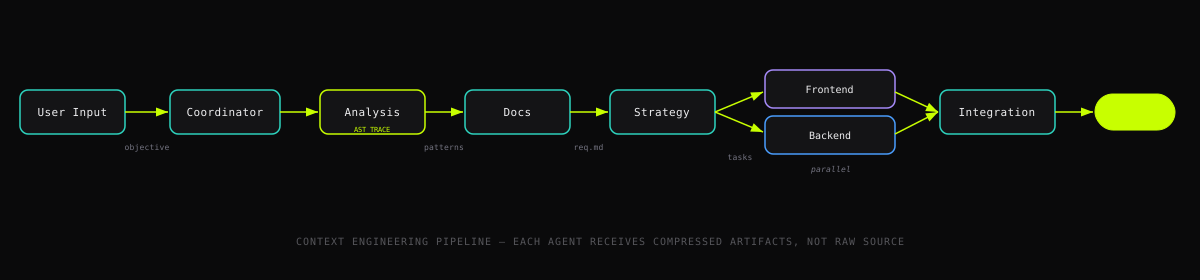
The key insight:
each phase produces a structured artifact that's smaller than its
input. The Analysis Agent reads source files and outputs a pattern report.
The Documentation Agent reads that report and outputs
requirement.md and tasks.md. By the time
work reaches the specialists, they receive a focused task list with
dependencies — not a pile of source files.
Entry-Point Filtering: The Biggest Win
The Analysis Agent doesn't scan the entire project. It starts from entry points — the files that actually get imported and executed — and traces the dependency graph from there.
// Simplified from the actual AST analyzer
const queue = [...entryPoints];  // e.g., src/app/layout.tsx, src/app/page.tsx

while (queue.length > 0) {
  const file = queue.shift();
  const imports = parseImports(file);  // TypeScript Compiler API

  for (const imp of imports) {
    if (imp.isRelative && !visited.has(imp.resolved)) {
      visited.add(imp.resolved);
      activePaths.add(imp.resolved);  // Only reachable files
      queue.push(imp.resolved);
    }
  }
}

// Result: activePaths contains ONLY files reachable from entry points
// Everything else is ignored
In a typical Next.js project, this eliminates 60–80% of files. Old utilities nobody imports. Abandoned components. Test fixtures. Config files for tools you stopped using. None of it enters an agent's context.
The implementation uses the TypeScript Compiler API to parse import statements from the AST — not regex, not file timestamps. If a file isn't reachable from an entry point through actual import chains, it doesn't exist as far as the agents are concerned.
Confidence-Based Pattern Filtering
Even within active files, not every pattern is worth reporting. The analyzer tracks how consistently each pattern appears across the codebase and assigns a confidence score.
// Only report patterns the codebase actively uses
if (confidence >= 0.8 && activeExamples >= 5) {
  return { status: 'active', confidence };
}
if (confidence < 0.3 || activeExamples === 0) {
  return { status: 'legacy' };  // Excluded from agent context
}
return { status: 'unclear' };  // Flagged for human review
This prevents a subtle failure mode: an agent sees
useContext used once in a forgotten file and starts
implementing state management with React Context — when the
project actually uses Zustand everywhere. With confidence filtering,
only the dominant patterns reach the agents.
What Each Agent Actually Sees
The result of these filtering layers:
- The Coordinator sees the user's objective and the list of enabled agents — nothing else
- The Analysis Agent sees active source files traced from entry points (not the full project tree)
- The Documentation Agent sees the analysis output — a structured pattern report, not source code
-
The Strategy Agent sees
requirement.mdandtasks.md— compressed, structured, dependency-aware - The Frontend Specialist sees only frontend tasks from the execution plan, with frontend-relevant patterns
- The Backend Specialist sees only backend tasks, with backend-relevant patterns
No agent sees everything. Each sees exactly what it needs.
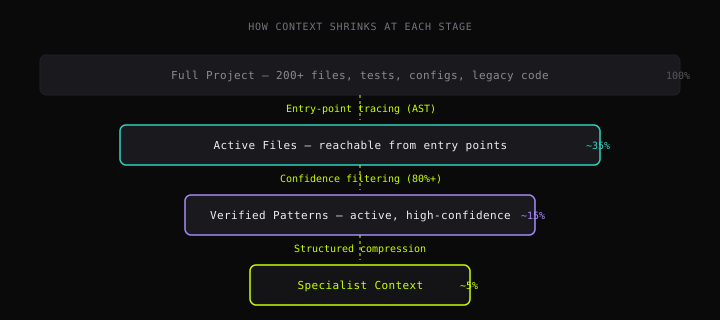
The question isn't "what can the model do?" It's "what should the model see?" A perfect prompt with noisy context still produces noisy output.
Context Engineering vs Prompt Engineering
Prompt engineering asks: how do I phrase this instruction?
Context engineering asks: what information should be present when the instruction runs?
They're complementary, but in multi-agent systems, context matters more. You can write the perfect prompt for a code review agent, but if its context includes 200 files when only 40 are relevant, the review will flag issues in dead code, suggest patterns from abandoned files, and miss the actual problems buried in noise.
The techniques here — entry-point tracing, confidence filtering, structured artifacts — are all forms of context engineering. Andrej Karpathy has called context engineering the real skill of working with LLMs. I agree. They decide what the model sees before you decide what to ask.
When This Pattern Fits
This approach works when you have:
- A codebase too large for one context window — if it fits in one pass, you don't need orchestration
-
Repeatable project structures — the
entry-point detection needs to know where to start (Next.js
app/, Reactsrc/App.tsx, Nodesrc/index.ts) - Cost sensitivity — if you're paying per token and running agents frequently, filtering 60–80% of context adds up fast
- Accuracy requirements — when hallucinating based on legacy patterns is worse than missing a file
It doesn't fit for exploratory tasks where you want the model to see everything, or for one-off prompts where orchestration overhead isn't worth it.
What I'd Do Differently Now
I built this system before tools like Claude Code's subagents existed. Today, the orchestration layer is simpler — you can dispatch specialized agents natively. (I recently used this to build an agent swarm that audited 111 projects in under 10 minutes).
The entry-point tracing and confidence filtering? I'd keep those exactly as they are. No orchestration framework will solve the fundamental problem: if the context is wrong, the output is wrong. No matter how good the model is.
That useContext hallucination from a single orphaned file
taught me something I keep coming back to: the most expensive token
isn't the one that costs the most. It's the one that distracts the
model from the right answer.
Context engineering is how you stop paying for it.